
I spent three years refining my second brain so you don't have to. Stop putting out fires and get strategic.
Strategic thinking demands available cognitive bandwidth.

If you implement a personal knowledge management system, you will:
Be more organized.
Forget less important shit.
Have more mental bandwidth for strategic thinking.
Make better decisions and use time more wisely.
This takes anywhere from 20 minutes to 2 days to set up and can be used for years with no maintenance or adjustment.
Origins
My buddies and I have some wicked group chats. One thing they shared with me that ended up changing my life forever was a systems article on the types of thinking:
Survival
Reactive
Adaptive
Strategic
And how each mode was only accessible if you had more time to access those states. A person so busy they are in survival mode doesn’t have time for strategy.
There’s a privilege to not being so busy that you have time to think.
Affording yourself that time comes from implementing systems that reduce cognitive load.
The largest opportunity is usually, in my experience, knowledge management and personal admin.
Read the papers in the References section on how reducing cognitive load is the only way toward strategic thinking.
Hence, the second brain.
Share with the group chat if you need gang to get a grip on their cognitive load.
Bush Firefighter to Strategy Master
People talk about feeling reactive. Like they are always catching up to something.
This is one of the modes of workflow we all experience.
Reactive work, proactive work, strategic work.
You have to find a way to decrease cognitive load in order to think strategically. 1
For many, this is impossible.
Subscribe if you like It’s Always Sunny in Philadelphia.
With one piece of software you can start right now. With a Claude pro account this is an agent you can set up in less than an hour. If you have a decent computer, you can run it yourself.
Fear not! There are a few ways you can implement this:
Free
Claude Cowork
Full Local-Machine
I Like Notes. A Lot.
I have an obsession with pens, pencils, writing stationery, notebooks, and paper.
On my list of least favorite sensory experiences is the feeling of a writing utensil scraping against a rough and uneven surface separated by thin, shitty paper.
Make me chew aluminum foil with ants crawling on my back before I subject myself willingly to such an undignified and bullshit writing experience.
On my shelves, you’ll find lab notebooks from my days as a chemist. Experiments and molecular diagrams sketched neatly. Physics calculations and nanoparticle recipes in the margins of tables, data, and observations.
Printed excerpts from articles collaged and annotated as references for new experiment ideas.
You’ll find binders of printed articles. Scribbled on and underlined. Chicken scratch in the margins. Reminders and to-dos as I react and consume the articles, linking the ideas to other things.
There are the journals. Small Moleskines and composition notebooks that held to-do list after to-do list. Idea after idea. Diagram upon diagram.
That’s just the shelves, haha.
My obsession with journals follows me digitally. First to Evernote, then OneNote, then I evolved and found Notion. Then again, finding Obsidian.
The emails, the recorded meeting notes, blogs, blog drafts, code blocks, websites, advertisements, transcripts, CRM information, DMs, texts, articles, and phone calls.
My problem was never that I didn’t like taking notes and hoarding information.
It was that nothing ever came of it.
I’d end up with piles of to-dos and notes and papers and get stressed out and paralyzed by all the information I had that was waiting to be digested and synthesized and acted upon. 2
At one point, I had three digital note software programs, two project management apps, and three physical notebooks.
And none of them overlapped or talked to the others!
Fuckin’ chaos.
My solution?
An autonomous second brain that connects all information inputs in my life, catalogs the information into a singular database, and provides weekly and daily reports on what’s going on and what I need to be focusing on next. 3
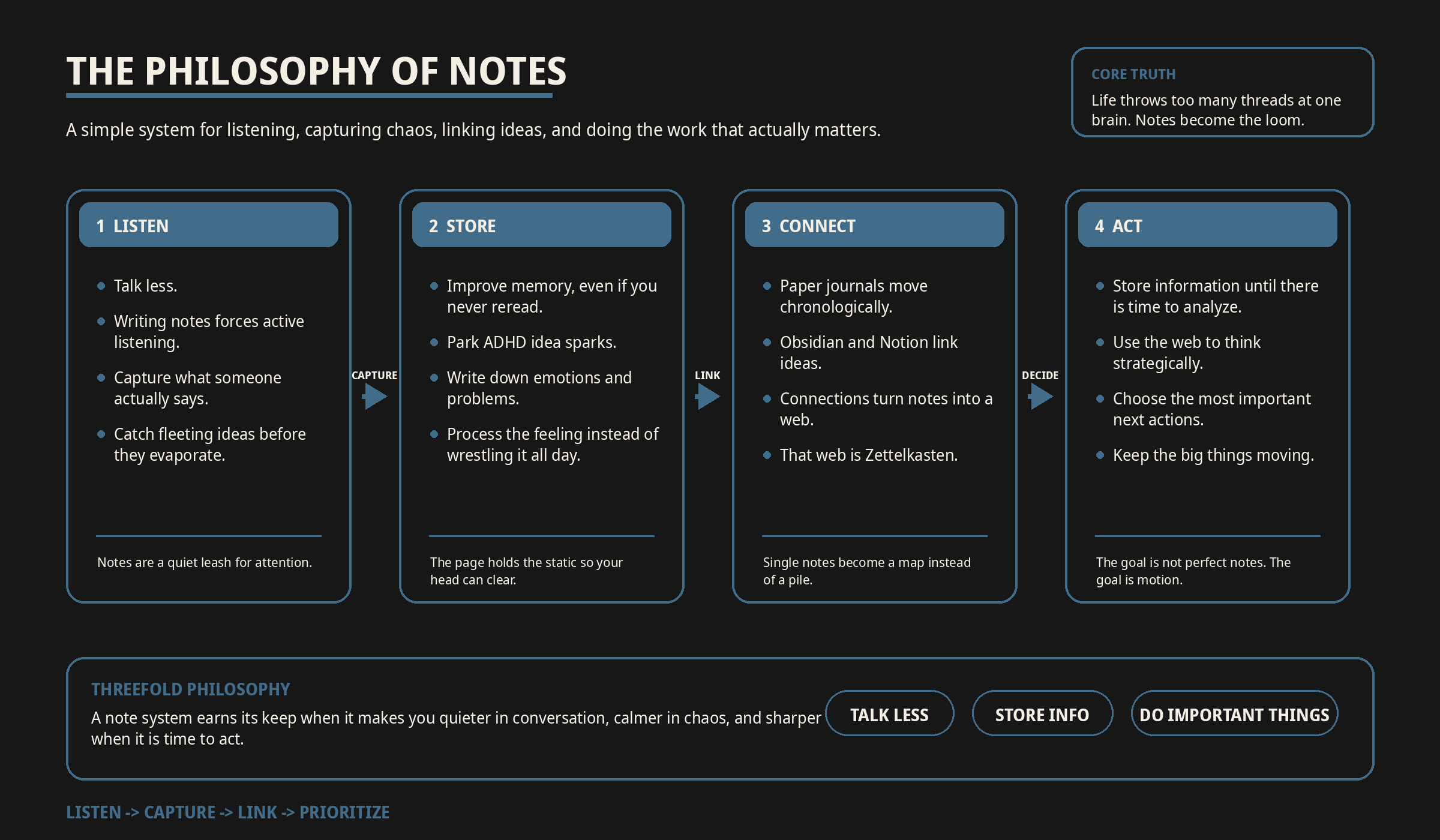
The Philosophy of Notes
Sometimes I need to shut the fuck up.
And, pro tip, you can’t talk when you’re writing notes about what’s going on and what someone else is saying.
Taking notes improves active listening.4
It works for me, and it can work for you too.
It improves memory retention. Even if you never look at it again.5
It gives me a place to write down the fleeting ideas.6
I am ADHD-AF. I think new ideas and random thoughts all the time, and if I don’t write them down, they are lost forever.
I also hyper-fixate on emotions and problems. Writing them down helps me feel the feelings, go through the emotional tunnel, and process what’s going on.7
In a paper journal, you’re writing chronologically.
In Obsidian, or Notion, or other linking-capable software, you can tie two ideas together to begin forming a web.
The connection of these ideas and experiences, and the capture of unique notes, is called Zettelkasten.8
The benefits are outstanding but can take time, energy, and discipline in the mundane to see results.
I do a lot. I coach CrossFit, train for ultramarathons, have a full-time job managing a manufacturing team, I’m on the board of directors for a rowing alumni group I founded, and I founded and run a company to deliver training workshops, a weekly podcast, and a biweekly blog. I have a wife I love, two dogs that love to walk, and a cat who follows me around like a shadow.
I have a lot of shit to keep track of.
I cannot do all of it every day.
I am constantly juggling.
My philosophy is threefold:
Talk less.
Store my information for when I have time to be strategic and analyze it. 9
Keep getting the most important things done.
How It Works
I built Peregrine through trial and error. I started out as an agent and over time graduated into constantly running software on my computers.
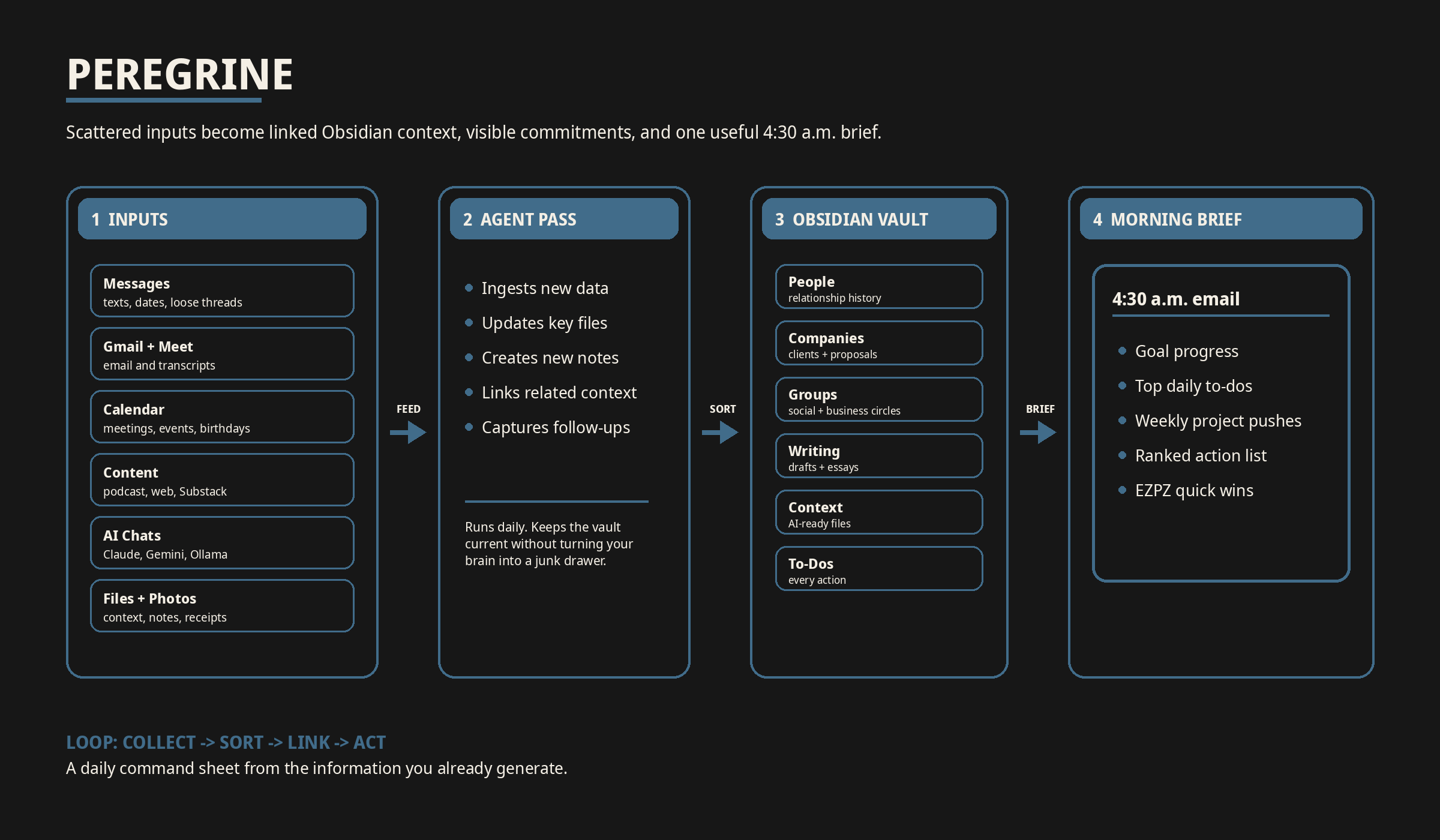
In brief, the inputs feed the Obsidian vault. Then, my agent combs the new data and updates a few key files, creating and appending files for anything new. The output, aside from the linked files, is a daily email to myself at 4:30 a.m. every morning.
For you, the inputs may vary.
For me, they are the following:
Inputs
iMessage
Texts about business
Texts with obligations and dates
Threads I forgot about
Gmail
Emails in and out
Meeting transcripts from Google Meet
Calendar
Meetings, scheduled, happening, or pushed
Creating time-sensitive tasks
Events, generally
Birthdays
Riverside
Podcast transcripts
Website
Visitor analytics
Workshop sign-ups
Substack
General analytics
AI Chat History
Claude
Gemini
Ollama
Context Files
Company Context
Details and dreams for Kestryl Edge
Writing Goals Context
Previously posted essays
In-progress drafts
Writing roadmap
Company Planning Context
Company roadmap
Marketing plans
Photos of My Physical Notebooks and Physical Articles
Anything I wrote in a notebook
Any schematics I scribbled on paper
Receipt photos
How the Information Gets Sorted
From there, the information gets sorted into folders in my Obsidian.
People
Who they are
Why they matter: friend, client, prospect, network, etc.
Details: birthday, likes/dislikes, allergies, recommendations, context
Actions and exchanges: Am I waiting on them for anything, or are they waiting on me?
Projects and assignments: For people on the Kestryl Team, what are they working on?
History and research: professional history highlights, any information provided for a podcast guest, for example
Brief timeline of when we met and the points at which we had interactions: meetings, emails, etc.
Companies
All people linked to companies
Tasks related to the companies: proposals, workshops, reports, meetings, etc.
Who the company is: prospect, customer, client, friend, referral
Groups
Social groups of friends
Business groups of peers and colleagues
Book club
Dinner groups
Writing
My drafts
My published essays
Context
All my context markdown files I use in my AI adventures.
To-Dos
Every to-do or action or follow-up. Every. Single. One.
Conversations for prospects that got dropped
People who are important and need a re-ping
All of these update files get tweaked, interlinked, and updated from every single day of new information from the input sources. 7
The Outputs
Lastly, I get a morning email with the following:
Summary of the week’s work so far in relation to my weekly/monthly/quarterly goals
The biggest to-dos on my plate for the day
The projects I need to push that week
A list of all my actions sorted by importance, with the easy ones labeled EZPZ
This does a few things for me.
I no longer have to rack my brain for the to-dos and actions of days before. They are all right there. 10
I don’t have to remind myself about following up because the follow-ups are remembered for me. 4
I get less distracted with side quests because the main storyline quest lines are right there, neat and tidy. 3
I have an updated to-do list. Every day. I don’t need to write a new one. The thinking is done. 7
I can follow my creative urges when I don’t have juice for work, and when I am ready to knock something out, I can tackle what’s at the top of my queue.
When I’m zapped and only have energy for the most transactional tasks? The EZPZ items are right there waiting for me.
My Methods
First of all, I don’t start coding or prompting without a requirements trace.
If I don’t know what the product requirements are, then I’m not building. Simple as that. If you don’t know how to do a systems level requirement trace… we can’t hang out anymore. All my homies trace their requirements. Sorry fam.
Subscribe if you trace your requirements.
User Need
A personal knowledge management system that reduces cognitive load, captures obligations and ideas across my work and life, organizes them into a trusted source of truth, and sends me a daily operating brief so I can focus on the most important work without constantly trying to remember everything.
System Requirements (full trace below)
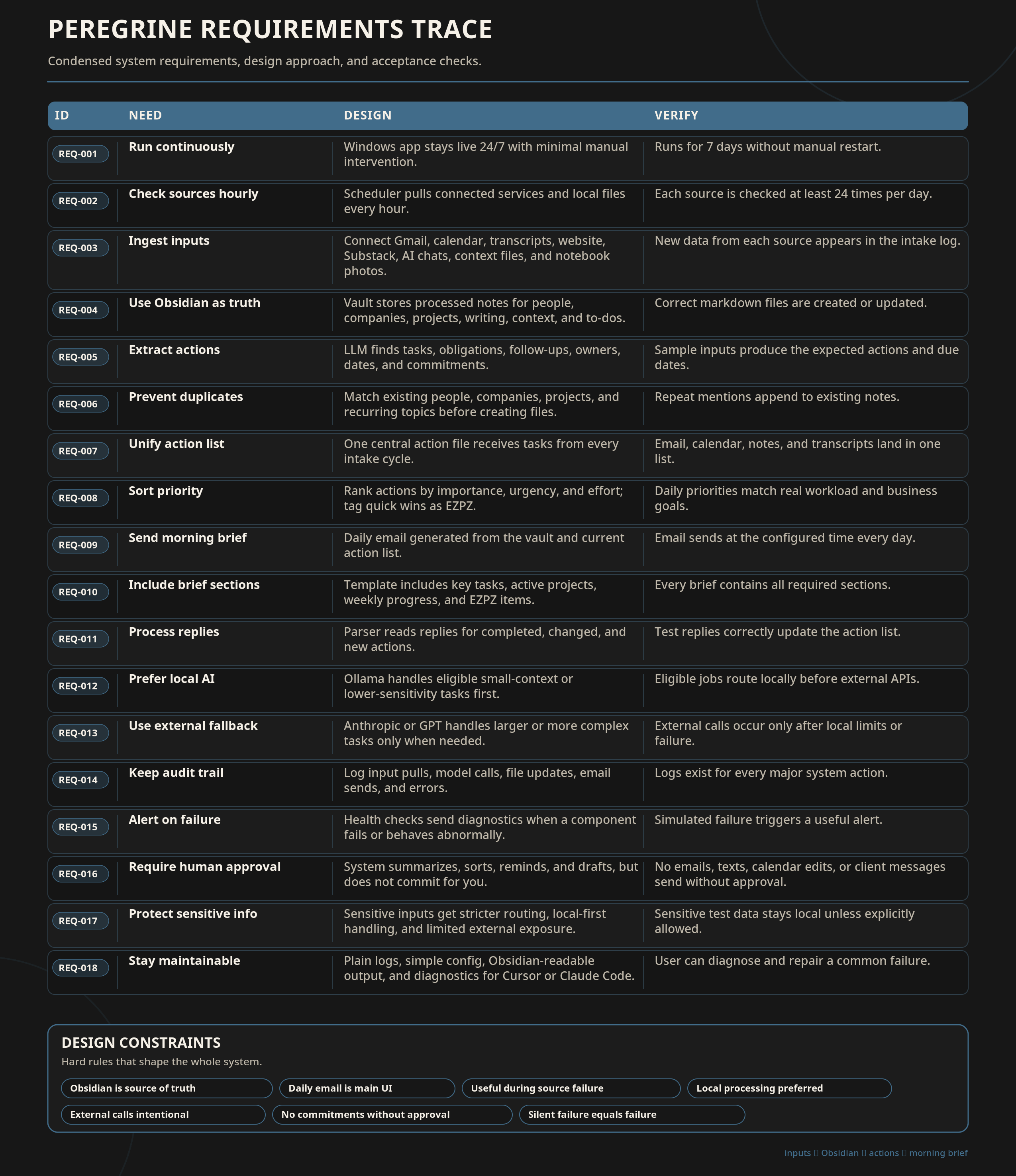
Acceptance Criteria
The system is successful if:
I receive a useful daily brief every morning.
The brief reflects real inputs from the previous day.
Follow-ups stop getting lost.
Important projects remain visible.
I spend less time rebuilding my to-do list from memory.
I can trace every major output back to an input source.
I can tell when the system is healthy, degraded, or broken.
The system reduces cognitive load instead of becoming another cursed productivity altar.
I set this program up using Claude Code and Cursor as a custom application running 24/7 on my Windows machine.
The tool itself calls local models in Ollama for small-context processing, and if Ollama fails, then it runs through my Anthropic or GPT API, depending on the task.
The connections are all monitored with an output in the daily email. The system is queued to do an hourly pull and a health check, and if any of the components fail or return abnormal results, I get a notification with error codes and diagnostics that I can push into Cursor/Claude for resolution. 2
OPSEC
Before anyone starts having a cow about SOC 2, yes, this system touches sensitive information.
Emails. Texts. Calendar invites. Client notes. Business plans. Meeting transcripts.
So I do not treat this like a toy.
The goal is not to shovel my entire life into an AI wood chipper and hope wisdom and ✨clarity✨ comes out the other side. The goal is to build a controlled system that helps me remember, prioritize, and act without spraying private information all over the internet like a busted fire hydrant. 2
A few rules matter.
First, not everything needs AI processing. Some information can be stored, indexed, and retrieved without being digested by a model. Just because an LLM can read something does not mean it should. 12
Second, local processing comes first when possible. Small-context tasks run locally through Ollama. If the task can be handled on my machine, it stays on my machine.
Third, external APIs are used intentionally. When something needs a stronger model, it can route through Anthropic or GPT depending on the task, but that is not the default for everything. Sensitive context gets treated differently from generic task sorting. 2
Fourth, I do not want the system making decisions for me. It can summarize, surface, sort, and remind. It does not send emails for me. It does not message clients for me. It does not make commitments for me. It does not pretend to be my judgment. It sorts, compiles, and organizes. 12
Fifth, this system needs logs, health checks, and failure alerts. If something breaks, I want to know. If an input stops syncing, I want to know. If a component returns something weird, I want diagnostics. Automation without visibility is just chaos wearing a lab coat. 2
And finally, this is not something I would blindly install inside a company without serious thought around permissions, retention, confidential information, client data, model routing, audit logs, and who gets access to what. 2
For my personal operating system, this is powerful.
For a team or company, this needs governance.
How To: The Three Ways to Build This
You do not need to build the full robot cave version on day one.
Please do not read this and immediately try to superglue together Gmail, Obsidian, OCR, local models, APIs, and a 24/7 Windows daemon with $100 in claude API tokens.
Start simple. Try things out. Do a requirements trace. Then build as you learn what helps you and what is, as GPT would call it, ‘a dumpsterfire wearing corduroy and saying m’lady,’ or whatever.
There are three useful versions of this system:
The free manual version
The Claude Cowork version
The full local-machine version
Pick the one that matches your current level of technical tolerance, and, importantly based on what you’re comfortable debugging.
Option 1: The Free Manual Version
This is the “I do not want to code anything, I do not want to automate anything, I just want my brain to stop leaking” version.
You can build this with Obsidian (or Notion, I think) and 20 minutes.
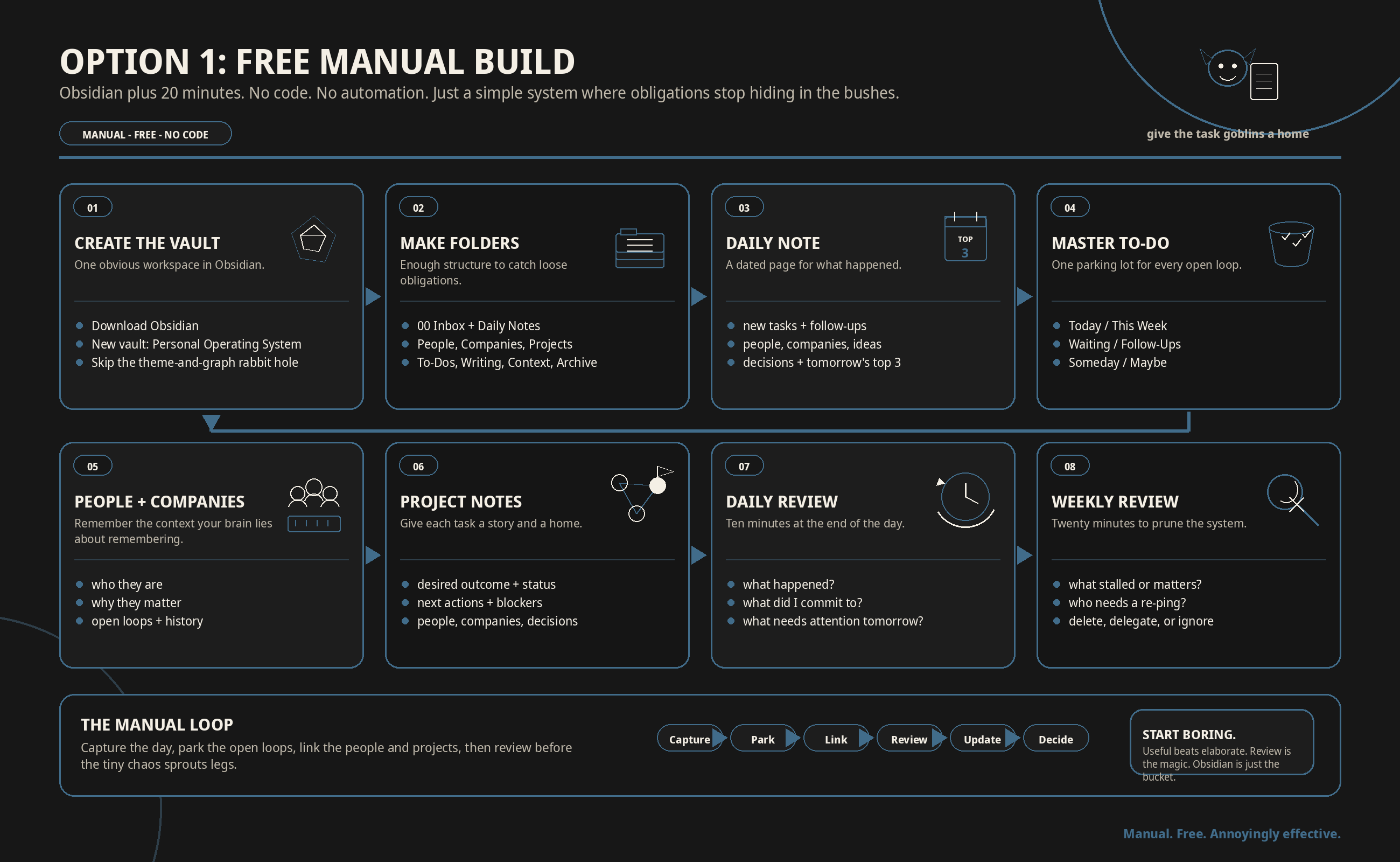
Step 1: Download Obsidian
Download Obsidian. (sync is $5/month at time of writing and allows your vault to go across all your devices.)
Create a new vault.
Name it something obvious.
Mine would be something like:
Personal Operating System
Usually I go bird themed though. Mine is called Peregrine.
Step 2: Create Your Main Folders
Create these folders:
00 Inbox
01 Daily Notes
02 People
03 Companies
04 Projects
05 To-Dos
06 Writing
07 Context
08 Archive
Step 3: Create One Daily Note Template
Create a note called:
Daily Note Template
Put this in it:
# Daily Note - YYYY-MM-DD

## What happened today?

-

## New tasks

- [ ]

## Follow-ups

- [ ]

## People I interacted with

-

## Companies or projects mentioned

-

## Ideas worth keeping

-

## Decisions made

-

## What needs my attention tomorrow?

1.
2.
3.
Every day, copy this template into a new daily note.
Name the note by date:
yyyy-mm-dd (or yyyymmdd if you’re a true G)
Step 4: Create a Master To-Do List
Create a note called:
Master To-Do List
Put every open loop in there. (there are plugins you can add that will scrub your notes and compile the to-do’s into a master list.)
Use this format:
# Master To-Do List

## Today

- [ ]

## This Week

- [ ]

## Waiting On Someone Else

- [ ]

## Follow-Ups

- [ ]

## Someday / Maybe

- [ ]
If it is not in the system, it does not exist.
Step 5: Create People Notes
Every important person gets a note.
Use this template:
# Person Name

## Who they are

## Why they matter
Friend, client, prospect, teammate, vendor, referral, etc.

## Important details
- Birthday:
- Likes:
- Dislikes:
- Context:
- Personal notes:

## Open loops
- [ ]

## History
-
This is where you put the stuff about people.
Birthday.
Names of kids.
Project details.
Referral context.
The allergy they mentioned once.
The thing they care about.
Their current house remodel or project.
Step 6: Create Company Notes
Every important company gets a note.
Use this template:
# Company Name

## What they are

Prospect, client, partner, referral source, vendor, etc.

## Key people

- [[Person Name]]

## Current status

## Open loops

- [ ]

## Opportunities

## History
-
This is especially useful if you sell, consult, manage clients, or run a business.
Which is to say: this is useful if your professional life contains other humans.
Step 7: Create Project Notes
Every project gets a note.
Use this template:
# Project Name

## Desired outcome

## Current status

## Next actions

- [ ]

## Blockers

## People involved

- [[Person Name]]

## Related companies

- [[Company Name]]

## Notes
[[Related note 1]]
[[related note 2]]

[[Meeting note 1]]
[[meeting note 2]]

## Decisions made
-
Step 8: Do a 10-Minute Daily Review
At the end of the day, open your daily note and answer:
What happened?
What did I commit to?
Who do I need to follow up with?
What did I learn?
What are the three most important things for tomorrow?
Then update:
Your master to-do list
Any relevant people notes
Any relevant company notes
Any relevant project notes
Step 9: Do a 20-Minute Weekly Review
Once per week, open:
Daily notes from the past week
Master to-do list
Active projects
People notes
Company notes
Then ask:
What did I keep avoiding?
What actually matters next week?
Who needs a follow-up?
What project is secretly dying in a ditch?
What can I delete, delegate, or ignore?
Ta-Da!
Other fun options are to import PDFs, meeting notes, important documents, and go through the community plug in pages to see what may be useful.
Option 2: The Claude Cowork Version
This is the middle path.
No local machine daemon. No code. No custom application.
Just Claude, connected sources, a recurring task, and a clear operating prompt.
This is for people who want the system to help them, but do not want to have to code anything, set up APIs, and you maintain access to a chat interface to edit the workflow at any point.
I’ve used this. It’s easy. It works.
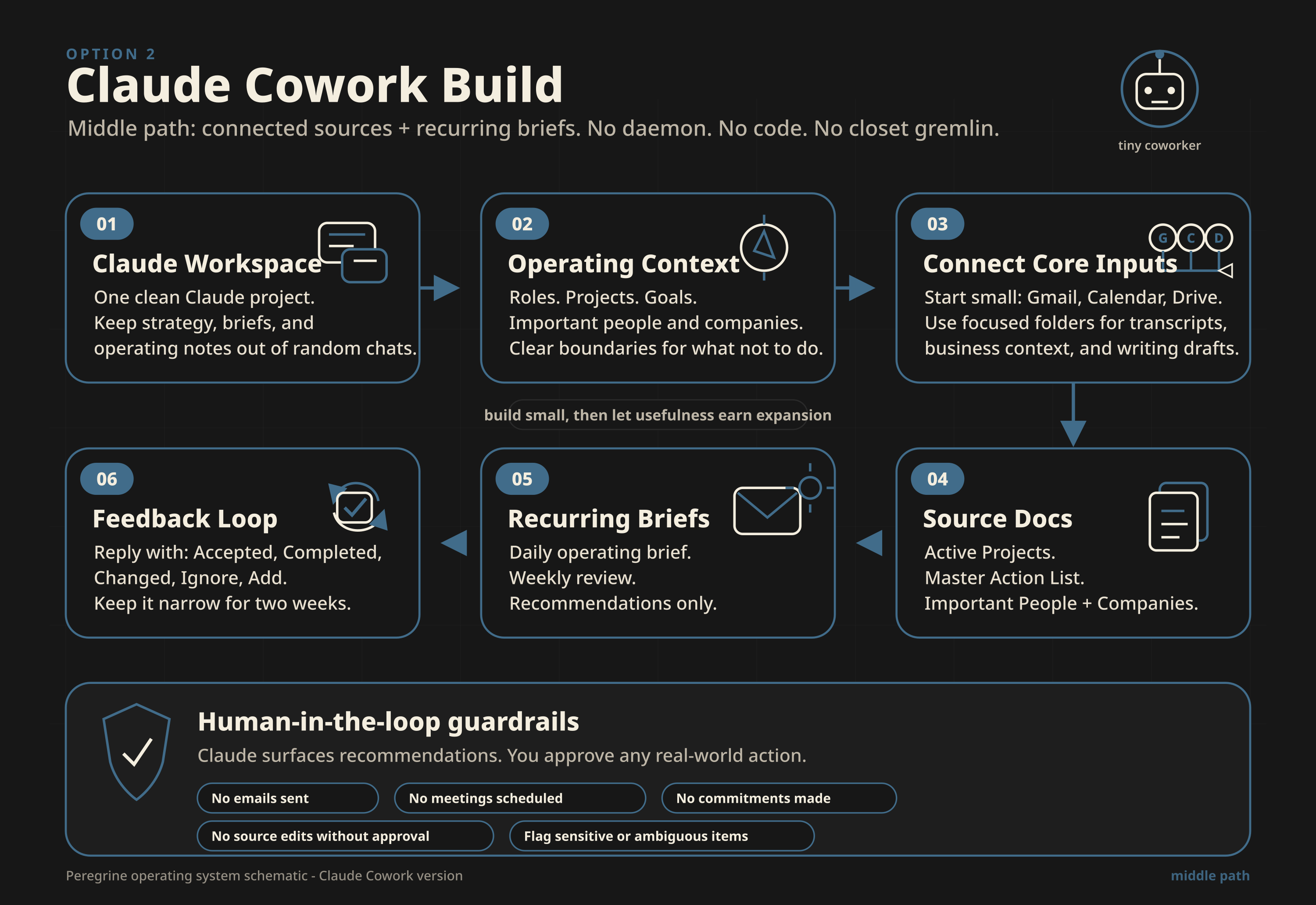
Step 1: Create a Claude Project or Workspace for Your Operating System
Create a dedicated Claude space for this.
Call it something obvious:
Personal Operating System
or
Daily Briefing System
or
Star Falcon (birds are sick)
Do not mix this workspace with random chats about recipes, memes, strategy, and racoon memes.
This works best in its own clean workspace.
Step 2: Add Your Core Context
Add a short context document that explains your life and priorities.
Use this:
# Personal Operating Context

## My main roles
-
-
-

## My active projects
-
-
-

## My current goals

### This week
-

### This month
-

### This quarter
-

## Important people
-

## Important companies or teams
-

## What I want help with

I want Claude to help me reduce cognitive load by reviewing my recent information, identifying tasks and follow-ups, organizing priorities, and preparing a daily operating brief.

## What Claude should not do

Claude should not send messages, make commitments, schedule meetings, or take action on my behalf unless I explicitly approve it.
In crystallography you can grow other crystals from a seed crystal. This, is a seed crystal.
You can expand upon this but this bare minimum gets you started.
Step 3: Connect the Inputs You Actually Need
Do not connect everything on day one.
That is how you build a haunted productivity aquarium.
Start with the basics:
Gmail
Google Calendar
Google Drive
If you have meeting transcripts in Drive, put them in a folder called:
Meeting Transcripts
(you can have it just scour gmail for it)
If you have business notes, put them in a folder called:
Business Context
If you have writing drafts, put them in:
Writing Drafts
etc., Claude just needs the streams that matter to you.
Step 4: Create Three Simple Source Documents
In Google Drive, create three documents.
Document 1: Active Projects
# Active Projects

## Project Name

### Desired outcome

### Current status

### Next actions

- [ ]

### Blockers

### People involved
-
Document 2: Master Action List
# Master Action List

## Today
- [ ]

## This Week
- [ ]

## Waiting On Someone Else
- [ ]

## Follow-Ups
- [ ]

## Someday / Maybe
- [ ]
Document 3: Important People and Companies
# Important People and Companies

## People

### Name
- Who they are:
- Why they matter:
- Open loops:
- Notes:

## Companies

### Company Name
- What they are:
- Key people:
- Current status:
- Open loops:
- Notes:
These are your source-of-truth documents. Claude can help update them.
And you can review them, no code required.
Blessed be the simple folder. <3
Step 5: Create the Daily Cowork Task
Create a recurring Claude Cowork task.
Set it to run every morning.
Use this prompt:
Review my connected Gmail, Google Calendar, and relevant Google Drive documents from the last 24 hours.

Use my Personal Operating Context, Active Projects, Master Action List, and Important People and Companies documents as the source of truth.

Create a daily operating brief with the following sections:

1. Top priorities for today
2. New tasks or obligations found
3. Follow-ups I owe
4. People waiting on me
5. People I am waiting on
6. Meetings or deadlines coming up
7. Active projects that need movement
8. Easy transactional tasks labeled EZPZ
9. Anything that looks dropped, stale, or neglected
10. Suggested updates to the Master Action List

Do not send emails.
Do not schedule meetings.
Do not make commitments.
Do not edit source documents unless I explicitly ask.
Surface recommendations only.
Flag anything sensitive or ambiguous instead of acting on it.
This creates the morning briefing.
Not a full second brain, but a very useful and time-saving daily summation! :)
Step 6: Create the Weekly Review Cowork Task
Create another recurring task.
Set it to run once per week.
Use this prompt:
Review the past 7 days of Gmail, Calendar, and relevant Google Drive documents.

Compare what happened this week against my Active Projects, Master Action List, and Personal Operating Context.

Create a weekly review with the following sections:

1. What moved forward
2. What stalled
3. What I avoided
4. Follow-ups that are aging
5. Projects that need attention
6. People I should re-ping
7. Decisions I made this week
8. New opportunities or risks
9. Suggested priorities for next week
10. Suggested edits to my Active Projects and Master Action List documents

Do not take action for me.
Do not send messages.
Do not schedule anything.
Do not edit source documents unless I approve the changes.
This is the version most people should build first.
Step 7: Add a Manual Confirmation Loop
When Claude gives you the daily brief, reply with:
Accepted:
-

Completed:
-

Changed:
-

Ignore:
-

Add:
-
This gives you a clean way to correct the system.
Step 8: Keep It Narrow for Two Weeks
For the first one-two weeks, avoid expanding the system.
Do not add six more sources.
Do not add automations.
Do not make it track your macros, your cat’s emotional state, and the moon phase of your inbox.
Just run:
Daily brief
Weekly review
Master action list
Active projects
Important people and companies
If it works, expand.
If it does not work, simplify.
That is engineering and also adulthood, unfortunately. :/
Option 3: The Full Local-Machine Version
This is the version I built.
I have explained my build procedure below. I think you should use this as a guide and do the work of creating what works for you. Building it yourself will teach you how it works and you’ll be able to customize and maintain over time.
This is for people who want the whole thing:
Local files
Obsidian vault
Scheduled pulls
Logs
Health checks
Local models
External model fallback
Daily email
Reply processing
Diagnostics
The full little cyber-possum
This is not where I recommend starting.
But if you want the robust version, here is the basic path.
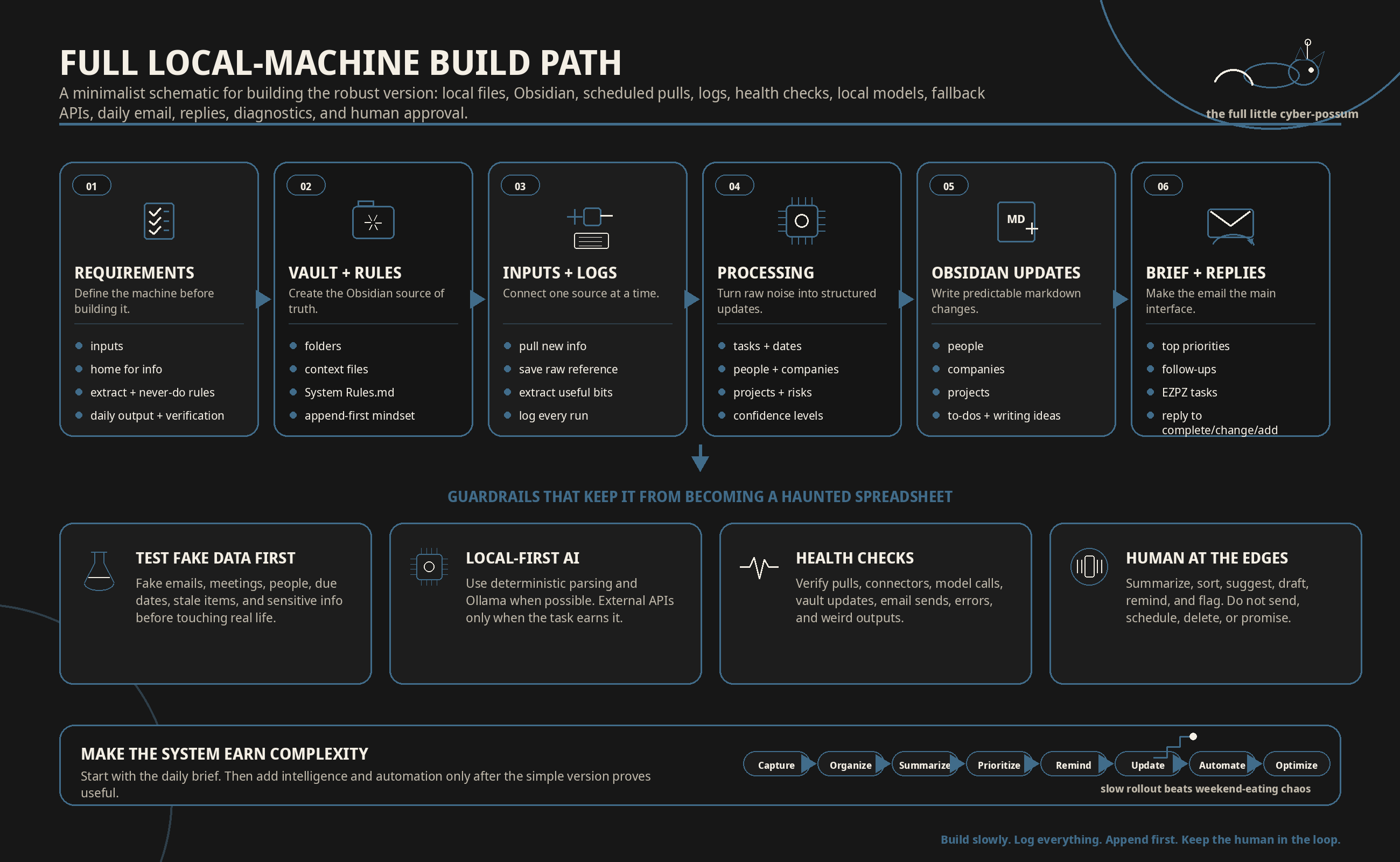
Step 1: Define Your Requirements First
At minimum, define:
What inputs the system needs
Where the information should live
What the system should extract
What the system should never do
What the daily output should include
How often the system should run
What should happen when something fails
How you will verify it works
If you cannot describe the system, you are not ready to build the system.
Step 2: Create the Obsidian Vault
Use the same vault structure from the manual version:
00 Inbox
01 Daily Notes
02 People
03 Companies
04 Projects
05 To-Dos
06 Writing
07 Context
08 Logs
09 Archive
The difference here is that the system updates the vault for you.
Obsidian is still the source of truth.
Step 3: Create Your Context Files
Inside 07 Context, create the context files you need. Claude stores its own but I have it sync and back up to these context files so that I always have them for use in local LLMs. Mine look like this:
Personal Operating Context.md
Company Context.md
Writing Goals Context.md
Current Goals.md
System Rules.md
The most important file is System Rules.md.
Use something like this:
# System Rules

## The system may
- Summarize information
- Extract tasks
- Identify follow-ups
- Update Obsidian files
- Prepare daily briefs
- Label easy tasks as EZPZ
- Flag stale projects
- Create draft recommendations

## The system may not
- Send emails without approval
- Send texts without approval
- Schedule meetings without approval
- Delete source information
- Make commitments on my behalf
- Send sensitive information to external models unless explicitly allowed

## Processing preference
1. Use deterministic parsing when possible.
2. Use local model processing when possible.
3. Use external APIs only when needed.
4. Log all model calls.
5. Flag ambiguous information instead of guessing.
Step 4: Build the Input Layer
Start with the least annoying inputs.
Avoid the temptation I aslo fight to start with everything.
Start with:
Local text files
Meeting transcripts
Calendar export
Gmail
Photos or OCR later
Build one input at a time.
For each input, the system should:
Pull new information
Save the raw input or a reference to it
Extract useful information
Update the right Obsidian files
Log what happened
If an input cannot be logged, it is not ready… yet.
Step 5: Build the Intake Log
Create a file or database table that records every run.
Each intake event should log:
Timestamp
Source
Files or records checked
New items found
Items processed
Model used
Files updated
Errors
Warnings
Source of truth needs traceability.
Step 6: Build the Processing Layer
The processing layer takes raw information and turns it into structured updates.
It should extract:
Tasks
Follow-ups
Dates
Decisions
People
Companies
Projects
Risks
Opportunities
Writing ideas
Each extracted item should include:
What it is
Where it came from
Who is involved
Whether action is needed
Suggested priority
Confidence level
Step 7: Build the Obsidian Update Layer
The system should update files in predictable places.
For example:
New person found → 02 People
New company found → 03 Companies
New project update → 04 Projects
New action → 05 To-Dos
New writing idea → 06 Writing
System event → 08 Logs
Every update should be append-friendly.
Do not let the system casually rewrite your entire knowledge base.
That is how you wake up and discover your notes have magically been organized out of existence, lol.
Append first.
Rewrite only with approval.
Step 8: Build the Daily Brief
The daily brief email is the main interface.
Every morning, the system should produce:
Summary of yesterday
Top priorities for today
Follow-ups I owe
People waiting on me
People I am waiting on
Meetings and deadlines
Projects that need motion
EZPZ tasks
Stale items
System health status
The daily brief should be short enough to read before coffee and useful enough to change the day.
Step 9: Build Reply Processing
This is where the system gets spicy.
When I reply to the daily email, the system checks whether I am:
Marking actions complete
Changing due dates
Adding new tasks
Rejecting bad suggestions
Clarifying ambiguous items
Use a simple reply format:
Completed:
-

Changed:
-

Add:
-

Ignore:
-

Notes:
-
The system should parse that reply and update the Obsidian files.
This creates a feedback loop.
Without the feedback loop, the system talks at you.
With the feedback loop, the system starts becoming useful.
Step 10: Add Local Model Processing
Once the basic system works, add local model processing.
Use local models for:
Small summaries
Low-sensitivity extraction
Classification
Formatting
Duplicate detection
Use external APIs only when:
The local model fails
The context is too large
The reasoning is too complex
The output quality matters more than keeping it local
No priacy or security inputs are included in.
Step 11: Add Health Checks
The system should check itself.
At minimum, it should verify:
Did the hourly pull run?
Did each connector work?
Did the model calls complete?
Did Obsidian files update?
Did the daily email send?
Were there errors?
Were there abnormal outputs?
If something fails, the system should tell you. Immediately.
Step 12: Test With Fake Data First
Before connecting your actual life, test with fake data.
Create some fake data! fake emails, fake meetings, fake people, fake companies.
Make sure the system can correctly identify:
A task
A follow-up
A due date
A person
A company
A project update
A completed action
A stale item
A sensitive item
A bad or ambiguous suggestion
Step 13: Turn It On Slowly
Do not connect everything at once.
Week 1:
Local files
Manual notes
Daily email
Week 2:
Calendar
Meeting transcripts
Week 3:
Gmail
Week 4:
Website, Substack, CRM, photos, and other inputs
Slow roll out ftw.
Step 14: Keep Human Approval at the Edges
The system can:
Summarize
Sort
Suggest
Draft
Remind
Flag
Update notes
The system should not automatically:
Email clients
Text people
Schedule meetings
Delete records
Make promises
Change strategy
Decide what matters without review
Step 15: Make the System Earn Complexity
Do not add features because they are cool.
Add features because the system has proven it needs them.
The order should be:
Capture
Organize
Summarize
Prioritize
Remind
Update
Automate
Optimize
Most people jump straight to optimize.
That is how you end up with a nothing burger.
Full Requirements Trace
REQ-001: Continuous Operation
Requirement: The system shall operate continuously with minimal manual intervention.
Design implementation: Custom application running 24/7 on my Windows machine.
Verification: Confirm the application remains active for 7 consecutive days without manual restart.
REQ-002: Hourly Monitoring
Requirement: The system shall monitor configured input sources at least once per hour.
Design implementation: Scheduled hourly pull from connected services and local files.
Verification: Confirm each configured input source is checked at least 24 times per day.
REQ-003: Input Ingestion
Requirement: The system shall ingest information from required personal and business inputs.
Design implementation: Connectors for Gmail, calendar, meeting transcripts, website data, Substack data, AI chat history, local context files, and notebook/photo inputs.
Verification: Confirm new data from each input source appears in the intake log.
REQ-004: Obsidian as Source of Truth
Requirement: The system shall store processed information in Obsidian as the primary knowledge base.
Design implementation: Obsidian vault used as the structured database for people, companies, projects, writing, context, and to-dos.
Verification: Confirm processed information creates or updates the correct markdown files in the vault.
REQ-005: Action Extraction
Requirement: The system shall identify tasks, obligations, follow-ups, dates, and commitments from incoming information.
Design implementation: LLM-assisted extraction from emails, transcripts, texts, notes, and context files.
Verification: Test against sample inputs and confirm the correct actions, owners, and due dates are extracted.
REQ-006: Duplicate Prevention
Requirement: The system shall update existing records instead of creating unnecessary duplicates.
Design implementation: Entity matching for people, companies, projects, and recurring topics.
Verification: Confirm repeated mentions of the same person, company, or project append to the existing file rather than creating duplicate records.
REQ-007: Unified Action List
Requirement: The system shall maintain a unified action list across all input sources.
Design implementation: Central to-do/action file updated from every intake cycle.
Verification: Confirm actions from email, calendar, notes, and transcripts all appear in one consolidated action list.
REQ-008: Priority Sorting
Requirement: The system shall sort actions by importance, urgency, and ease of completion.
Design implementation: Priority logic that labels high-priority items and marks low-friction tasks as EZPZ.
Verification: Review the daily brief and confirm priorities match actual workload and business goals.
REQ-009: Daily Email Brief
Requirement: The system shall send a daily email brief each morning.
Design implementation: Automated email generated from updated Obsidian files and the current action list.
Verification: Confirm the email sends successfully at the configured time each day.
REQ-010: Required Brief Sections
Requirement: The daily email shall include the most important tasks, active projects, weekly progress, and easy transactional items.
Design implementation: Daily summary template populated from project files, goal files, and the action list.
Verification: Confirm each daily email contains all required sections.
REQ-011: Reply Processing
Requirement: The system shall detect replies to the daily email and update actions accordingly.
Design implementation: Email reply parser reviews responses for completed actions, changed actions, and new actions.
Verification: Reply to the daily email with test updates and confirm the action list changes correctly.
REQ-012: Local-First Processing
Requirement: The system shall use local model processing when possible.
Design implementation: Ollama handles small-context or lower-sensitivity processing tasks.
Verification: Confirm eligible tasks are routed through local models before external APIs are used.
REQ-013: External Model Fallback
Requirement: The system shall route larger or more complex tasks to external LLM APIs only when needed.
Design implementation: Fallback routing to Anthropic or GPT API depending on task type and model requirements.
Verification: Confirm external API calls occur only when local processing fails or the task exceeds local capability.
REQ-014: Audit Trail
Requirement: The system shall produce an audit trail of intake, processing, routing, and output events.
Design implementation: Logs generated for input pulls, model calls, file updates, email sends, and errors.
Verification: Confirm logs exist for each major system action.
REQ-015: Failure Alerts
Requirement: The system shall notify me when a component fails or returns abnormal results.
Design implementation: Health checks and error notifications with diagnostic information.
Verification: Simulate connector failure and confirm the system sends an alert with useful diagnostics.
REQ-016: Human Approval for External Actions
Requirement: The system shall not autonomously send messages, make commitments, or act on my behalf without human approval.
Design implementation: Output limited to summaries, reminders, sorting, and draft-level recommendations.
Verification: Confirm no outbound emails, texts, calendar changes, or client messages are sent without manual approval.
REQ-017: Sensitive Information Handling
Requirement: The system shall treat sensitive information differently from generic task information.
Design implementation: Sensitive inputs routed with stricter processing rules, local-first handling, and limited external exposure.
Verification: Confirm sensitive test inputs are not sent to external APIs unless explicitly allowed.
REQ-018: Maintainability
Requirement: The system shall be maintainable by me without requiring a full engineering team.
Design implementation: Plain-language logs, simple configuration files, Obsidian-readable outputs, and diagnostics that can be pushed back into Cursor or Claude Code.
Verification: Confirm I can identify, troubleshoot, and repair a common failure without rewriting the whole system.
Design Constraints
The system has a few hard constraints:
Obsidian is the source of truth.
The system must be useful even if one input source temporarily fails.
Local processing is preferred when possible.
External LLM calls are intentional, not automatic for everything.
The system can summarize, sort, and remind, but it cannot make commitments for me.
The daily email is the main user interface.
If the system fails silently, the system has failed.
Closing
Memory improves when we process information more deeply than just storing it.11 I encourage people to build a system that allows you to write by hand while taking advantage of the cognitive load reducing benefits of an automated second brain.
Good luck on your build and drop a comment if you end up using or building a second brain!
~d
The Updraft
Writing on leadership, management, and emotional intelligence. Occasionally, like today, writing on the systems that make good management and leadership possible.
I founded and own Kestryl Edge, LLC a training company dedicated to forging the best leaders possible.
Acknowledgments
Photos generated from ChatGPT using my notes and gpt 5.5.
It’s always sunny meme shamelessly copied from knowyourmeme.
References
Sweller, John. “Cognitive Load During Problem Solving: Effects on Learning.” Cognitive Science 12, no. 2 (1988): 257-285. doi:10.1016/0364-0213(88)90023-7. What we learn: when the brain is overloaded, learning and higher-level thinking get worse.
Leroy, Sophie. “Why Is It So Hard to Do My Work? The Challenge of Attention Residue When Switching Between Work Tasks.” Organizational Behavior and Human Decision Processes 109, no. 2 (2009): 168-181. doi:10.1016/j.obhdp.2009.04.002. What we learn: unfinished work follows you into the next task and steals part of your attention.
Risko, Evan F., and Sam J. Gilbert. “Cognitive Offloading.” Trends in Cognitive Sciences 20, no. 9 (2016): 676-688. doi:10.1016/j.tics.2016.07.002. What we learn: reminders, notes, calendars, and tools reduce mental load by carrying some of the thinking for us.
Rogers, Carl R., and Richard E. Farson. Active Listening. Chicago: Industrial Relations Center, University of Chicago, 1957. What we learn: listening is an active leadership behavior, not just being quiet while someone else talks.
Kiewra, Kenneth A. “Investigating Notetaking and Review: A Depth of Processing Alternative.” Educational Psychologist 20, no. 1 (1985): 23-32. doi:10.1207/s15326985ep2001_4. What we learn: taking notes helps because writing forces processing, and reviewing notes helps even more.
Masicampo, E. J., and Roy F. Baumeister. “Consider It Done! Plan Making Can Eliminate the Cognitive Effects of Unfulfilled Goals.” Journal of Personality and Social Psychology 101, no. 4 (2011): 667-683. doi:10.1037/a0024192. What we learn: making a specific plan can quiet the mental noise of unfinished goals.
Pennebaker, James W., and Sandra K. Beall. “Confronting a Traumatic Event: Toward an Understanding of Inhibition and Disease.” Journal of Abnormal Psychology 95, no. 3 (1986): 274-281. doi:10.1037/0021-843X.95.3.274. What we learn: writing about emotional experiences can help people process them, though it can feel worse before it feels better.
Luhmann, Niklas. “Communicating with Slip Boxes: An Empirical Account.” Translated by Manfred Kuehn, 2015. What we learn: serious thinking gets stronger when notes are connected into a living system instead of stored as dead scraps.
Kirsh, David, and Paul Maglio. “On Distinguishing Epistemic from Pragmatic Action.” Cognitive Science 18, no. 4 (1994): 513-549. doi:10.1207/s15516709cog1804_1. What we learn: sometimes moving information into the world helps us think better than trying to do everything in our heads.
Einstein, Gilles O., Mark A. McDaniel, Carrie L. Williford, Jason L. Pagan, and R. Key Dismukes. “Forgetting of Intentions in Demanding Situations Is Rapid.” Journal of Experimental Psychology: Applied 9, no. 3 (2003): 147-162. doi:10.1037/1076-898X.9.3.147. What we learn: in demanding environments, people forget intended actions quickly, so external reminders matter.
Craik, Fergus I. M., and Robert S. Lockhart. “Levels of Processing: A Framework for Memory Research.” Journal of Verbal Learning and Verbal Behavior 11, no. 6 (1972): 671-684. doi:10.1016/S0022-5371(72)80001-X. What we learn: memory improves when we process information more deeply instead of just storing it.